 Skylolerr
Daily Challenge
Daily goals you can count, right in Home Assistant. Daily Challenge tracks amounts you want to reach every day – 20 push-ups, 30 minutes of reading, 8 glasses of water – with streaks, target vs. actual over the whole challenge, an optional catch-up mode and its own dashboard card.
- Streaks
- Target vs. actual
- Catch-up mode
- Dashboard card

See it in action



Features
Track your goal
- A daily amount, not a yes/no habit – each challenge has its own daily target, unit and buttons.
- Target vs. actual over the whole runtime – ahead or behind at a glance.
- With an end date: what is left, in how many days, and the average still needed per day.
- Correct any past day with the actions.
Stay motivated
- Streaks with a choice of rule – daily target reached, or any amount.
- Best streak, best day, daily average and weekly, monthly and yearly sums.
- Optional catch-up mode – a missed day can be made up the next day without breaking the streak.
- Reminder blueprint – a notification at 20:00 while today's goal is still open.
Fits into Home Assistant
- Its own card with a progress ring, quick buttons, undo, streak and target vs. actual, plus a visual editor – installed and registered automatically.
- Plain entities that work just as well with Tile, Entities, Mushroom or ApexCharts.
- English, German, French and Italian, light and dark theme, your number format.
The card
The card comes with the integration and is registered as a dashboard resource automatically. Add it in the dashboard editor (Add card → Daily Challenge) and switch each part on or off in the visual editor, or in YAML:
type: custom:daily-challenge-card
entity: number.push_ups_today   # any entity of the challenge
show_streak: true
show_target_vs_actual: true
show_remaining: true
show_required_average: true
show_catch_up: true
show_buttons: true
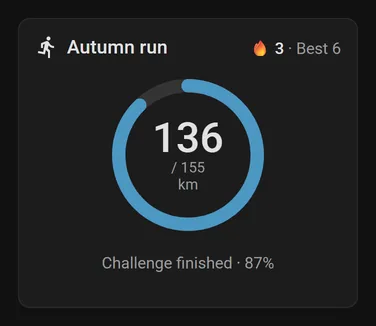
After the end date the card shows the total against the end goal.
Requirements and installation
Beta. Breaking changes are possible before 1.0. They are always listed in the changelog, and your recorded data is migrated, never dropped.
Requirements
- Home Assistant 2026.10.0 or newer.
- HACS for the installation (or a manual copy, see below).
Installation
-
Add it to HACS
Click Open in HACS – My Home Assistant opens the repository in your own Home Assistant – and select Download.
Or add it as a custom repository by hand:
- Open HACS in the sidebar.
- Open the ⋮ menu at the top right and choose Custom repositories.
- Enter
https://github.com/Skylolerr/ha-daily-challenge, choose the type Integration and select Add. - Search for Daily Challenge in HACS and select Download.
-
Restart Home Assistant
Settings → System → the power button at the top right → Restart Home Assistant.
-
Add a challenge
Settings → Devices & services → Add integration → Daily Challenge, or use the button. Enter a name, unit and daily target. Each challenge is its own entry; add the integration again for another one.
-
Add the card
Edit dashboard → Add card → Daily Challenge.
Manual installation: download daily_challenge.zip from the latest release, extract it to config/custom_components/daily_challenge/ and restart Home Assistant.
Frequently asked questions
How do I track a daily goal like push-ups or glasses of water in Home Assistant?
Install Daily Challenge, add the integration and enter a name, a unit and a daily target – for example 20 push-ups. Add the Daily Challenge card to a dashboard and tap +1, +5 or +10 whenever you have done some. The card shows today's progress, your streak and whether you are ahead of or behind your target.
Is Daily Challenge a habit tracker?
It tracks amounts, not yes/no habits. Each challenge has a daily target and a unit, so it counts how much you did each day, adds it up over the whole challenge and compares it with the target to date. If you prefer, any amount above 0 can count for the streak.
What happens to my streak if I miss a day?
Without catch-up, a missed day ends the streak. In the optional catch-up mode, yesterday's deficit is added to today's target; if you make it up today, yesterday still counts and the streak survives. Only yesterday can be rescued, nothing older.
Can I correct a past day?
Yes. The actions daily_challenge.set and daily_challenge.add take an optional date, so you can correct any day between the start date and today – for example from the developer tools or an automation.
Can Home Assistant remind me when today's goal is not reached?
Yes. Import the reminder blueprint: at a time you choose, 20:00 by default, it notifies you while today's goal is still open. The message can include what is still missing.
Can I use other cards such as Mushroom, Tile or ApexCharts?
Yes. Every challenge creates plain entities: a number for today's value, buttons for the steps and sensors for today's target, progress, total, streaks, ahead or behind and more. They work with any card, in automations and in the history.
Can I track several challenges at once?
Yes. Each challenge is its own entry: add the integration again for the next one. Each gets its own device, entities and card.
Does anything reset at midnight, and what if Home Assistant is off?
Nothing is reset. Every value is stored with its date, so a new day simply starts empty. Restarts, daylight saving time and Home Assistant being off over midnight are no problem.
Which Home Assistant version does Daily Challenge need?
Home Assistant 2026.10.0 or newer. The card is installed and registered automatically with the integration.
Can I set an upper limit, such as at most one coffee a day?
Not yet. Daily Challenge supports at-least goals only, and there are no rest or skip days: daily means every day.
Links
- GitHub repositorySource code and full documentation
- ReleasesDownload and release notes
- IssuesReport a bug or suggest a feature
- ChangelogWhat changed in each version
Like Daily Challenge? It is free and open source. If it keeps you going, you can support its development with a coffee.
Buy me a coffee